
会话服务接口实现-Service
一、本章介绍
当智能体装配完成后,下一步需要对外提供统一的会话服务能力,作为智能体运行与交互的基础入口。服务内容主要涵盖已注册智能体列表查询(agentId)、会话实例创建,以及消息处理能力,包括同步响应和异步响应两种交互模式。
二、流程设计
如图,会话接口服务所在分层;
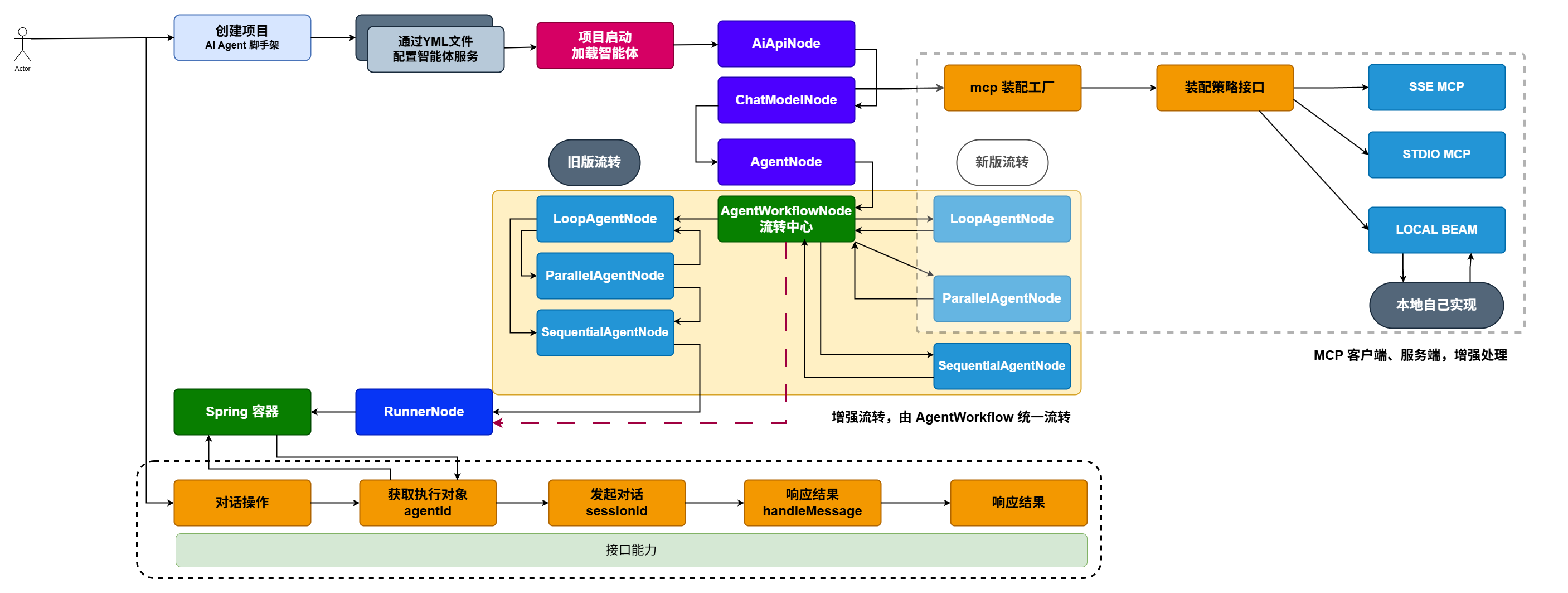
在完成 Agent 智能体装配后,下一步需要对外提供统一的服务能力。按照当前系统的分层设计,对外服务由 trigger 层负责提供 HTTP 接口。
这里的 trigger 可以理解为传统 MVC 架构中的 Controller,但在微服务架构下,系统的触发方式并不局限于 HTTP 请求,还包括消息队列、定时任务、RPC 调用等多种形式。本质上,这些都属于业务执行的触发入口。因此,在 DDD 分层设计中,统一抽象出 trigger(触发器)层,用于承载各类外部触发行为。
本节内容将优先实现领域层中的 service 服务能力。在 agent 领域模块下,除了负责智能体的装配与管理外,还需要提供会话管理和消息处理等核心能力。待 service 层实现完成后,再由 trigger 层进行封装,对外暴露标准化的接口服务,供业务系统调用。
三、功能实现
1. 工程结构
在定义的 IChatService 服务接口中,新增了 queryAiAgentConfigList、createSession、handleMessage、handleMessageStream 四个核心方法,分别用于查询智能体配置列表、创建会话、处理同步消息以及处理流式消息响应。
同时,定义了 ChatCommandEntity 对话命令实体作为统一的参数载体。在实际使用时,既可以根据业务场景直接传递参数调用方法,也可以通过命令对象封装请求数据进行处理。
相比于直接传参的方式,使用命令对象能够更好地管理和组织参数结构。当后续需要增加会话标识、用户信息、上下文参数、模型配置等扩展字段时,只需在对象中补充对应属性即可,无需频繁调整接口定。
2. 核心模块
2.1 命令对象
public class ChatCommandEntity {

    private String agentId;

    private String userId;

    private String sessionId;

    private List<Content.Text> texts;

    private List<Content.File> files;

    private List<Content.InlineData> inlineDatas;

	............
}ChatCommandEntity对话命令对象中,需要包含agentId、userId、sessionId等基础会话参数,同时还要支持texts、files、inlineDatas等多模态输入内容,用于覆盖文本、文件以及内联数据等不同类型的消息场景。此外,在
ChatCommandEntity中提供了build建造者方法,用于根据不同的入参组合快速创建命令对象。这样在实际调用时,可以按需选择对应的构建方式,既能减少重复参数传递,也能让对象创建过程更加清晰,便于后续扩展更多会话参数或多模态字段。
2.2 接口定义
/**
 * 对话接口
 */
public interface IChatService {

    List<AiAgentConfigTableVO.Agent> queryAiAgentConfigList();

    String createSession(String agentId, String userId);

    List<String> handleMessage(String agentId, String userId, String message);

    List<String> handleMessage(String agentId, String userId, String sessionId, String message);

    Flowable<Event> handleMessageStream(String agentId, String userId, String sessionId, String message);

    List<String> handleMessage(ChatCommandEntity chatCommandEntity);

}
首先,无论是创建会话,还是处理消息,都必须传入
agentId,用于明确本次请求要调用哪一个智能体服务。这个agentId可以通过queryAiAgentConfigList查询已装配的智能体列表获取,也可以由前端根据业务场景配置一个固定值。只有确定了目标智能体,后续的会话创建和消息处理才能正常执行。其次,
userId用于标识当前发起会话的用户,说明是谁在与智能体进行交互。而sessionId则用于串联同一次会话的上下文信息,确保在多轮对话过程中,系统能够持续关联历史消息,从而完成具备上下文记忆的会话处理。最后,
chatCommandEntity作为统一的对话命令对象,提供了多模态消息承载能力。不仅可以传递文本内容,也可以携带图片、文件等信息,实现文本与多媒体数据的组合输入。
2.3 接口实现
public class ChatService implements IChatService {

    @Resource
    private DefaultArmoryFactory defaultArmoryFactory;

    @Resource
    private AiAgentAutoConfigProperties aiAgentAutoConfigProperties;

    private final Map<String, String> userSessions = new ConcurrentHashMap<>();

    @Override
    public List<AiAgentConfigTableVO.Agent> queryAiAgentConfigList() {
        Map<String, AiAgentConfigTableVO> tables = aiAgentAutoConfigProperties.getTables();

        List<AiAgentConfigTableVO.Agent> agentList = new ArrayList<>();
        if (null != tables) {
            for (AiAgentConfigTableVO vo : tables.values()) {
                if (null != vo.getAgent()) {
                    agentList.add(vo.getAgent());
                }
            }
        }

        return agentList;
    }

    @Override
    public String createSession(String agentId, String userId) {
        AiAgentRegisterVO aiAgentRegisterVO = defaultArmoryFactory.getAiAgentRegisterVO(agentId);

        if (null == aiAgentRegisterVO) {
            throw new AppException(ResponseCode.E0001.getCode());
        }

        String appName = aiAgentRegisterVO.getAppName();
        InMemoryRunner runner = aiAgentRegisterVO.getRunner();

        return userSessions.computeIfAbsent(userId, uid -> {
            Session session = runner.sessionService().createSession(appName, uid).blockingGet();
            return session.id();
        });
    }

    @Override
    public List<String> handleMessage(String agentId, String userId, String message) {

        AiAgentRegisterVO aiAgentRegisterVO = defaultArmoryFactory.getAiAgentRegisterVO(agentId);

        if (null == aiAgentRegisterVO) {
            throw new AppException(ResponseCode.E0001.getCode());
        }

        String sessionId = createSession(agentId, userId);

        return handleMessage(agentId, userId, sessionId, message);
    }

    @Override
    public List<String> handleMessage(String agentId, String userId, String sessionId, String message) {

        AiAgentRegisterVO aiAgentRegisterVO = defaultArmoryFactory.getAiAgentRegisterVO(agentId);

        if (null == aiAgentRegisterVO) {
            throw new AppException(ResponseCode.E0001.getCode());
        }

        InMemoryRunner runner = aiAgentRegisterVO.getRunner();

        Content userMsg = Content.fromParts(Part.fromText(message));
        Flowable<Event> events = runner.runAsync(userId, sessionId, userMsg);

        List<String> outputs = new ArrayList<>();
        events.blockingForEach(event -> outputs.add(event.stringifyContent()));

        return outputs;
    }

    @Override
    public Flowable<Event> handleMessageStream(String agentId, String userId, String sessionId, String message) {
        AiAgentRegisterVO aiAgentRegisterVO = defaultArmoryFactory.getAiAgentRegisterVO(agentId);

        if (null == aiAgentRegisterVO) {
            throw new AppException(ResponseCode.E0001.getCode());
        }

        InMemoryRunner runner = aiAgentRegisterVO.getRunner();

        Content userMsg = Content.fromParts(Part.fromText(message));
        return runner.runAsync(userId, sessionId, userMsg);
    }

    @Override
    public List<String> handleMessage(ChatCommandEntity chatCommandEntity) {
        AiAgentRegisterVO aiAgentRegisterVO = defaultArmoryFactory.getAiAgentRegisterVO(chatCommandEntity.getAgentId());

        if (null == aiAgentRegisterVO) {
            throw new AppException(ResponseCode.E0001.getCode());
        }

        List<Part> parts = new ArrayList<>();

        List<ChatCommandEntity.Content.Text> texts = chatCommandEntity.getTexts();
        if (null != texts && !texts.isEmpty()) {
            for (ChatCommandEntity.Content.Text text : texts) {
                parts.add(Part.fromText(text.getMessage()));
            }
        }

        List<ChatCommandEntity.Content.File> files = chatCommandEntity.getFiles();
        if (null != files && !files.isEmpty()) {
            for (ChatCommandEntity.Content.File file : files) {
                parts.add(Part.fromUri(file.getFileUri(), file.getMimeType()));
            }
        }

        List<ChatCommandEntity.Content.InlineData> inlineDatas = chatCommandEntity.getInlineDatas();
        if (null != inlineDatas && !inlineDatas.isEmpty()) {
            for (ChatCommandEntity.Content.InlineData inlineData : inlineDatas) {
                parts.add(Part.fromBytes(inlineData.getBytes(), inlineData.getMimeType()));
            }
        }

        Content content = Content.builder().role("user").parts(parts).build();

        // 获取运行体
        InMemoryRunner runner = aiAgentRegisterVO.getRunner();

        Flowable<Event> events = runner.runAsync(chatCommandEntity.getUserId(), chatCommandEntity.getSessionId(), content);

        List<String> outputs = new ArrayList<>();
        events.blockingForEach(event -> outputs.add(event.stringifyContent()));

        return outputs;
    }


}- 这部分代码也就是测试代码中的能力,拿过来使用即可。
四、功能测试
@Slf4j
@RunWith(SpringRunner.class)
@SpringBootTest
public class ChatServiceTest {

    @Resource
    private IChatService chatService;

    @Value("classpath:file/cat.png")
    private org.springframework.core.io.Resource imageResource;

    @Test
    public void test_handleMessage_01() {
        List<String> message = chatService.handleMessage("100003", "cactusli", "你具备哪些能力");
        log.info("测试结果:{}", JSON.toJSONString(message));
    }

    @Test
    public void test_handleMessage_04_withImage() throws IOException {
        String agentId = "100003";
        String userId = "cactusli";

        String sessionId = chatService.createSession(agentId, userId);

        ChatCommandEntity chatCommandEntity = ChatCommandEntity.builder()
                .agentId(agentId)
                .userId(userId)
                .sessionId(sessionId)
                .texts(List.of(new ChatCommandEntity.Content.Text("请识别这个图片。告诉我它是什么动物,并用一句话描述。")))
                .files(List.of())
                .inlineDatas(List.of(new ChatCommandEntity.Content.InlineData(imageResource.getContentAsByteArray(), MimeTypeUtils.IMAGE_PNG_VALUE)))
                .build();

        List<String> message = chatService.handleMessage(chatCommandEntity);
        log.info("测试结果:{}", JSON.toJSONString(message));
    }

}- 在工程 resource 下添加一个
cat.png图片资源,你也可以放其他的图片或者文件。