
一、本章介绍
调整整体架构设计,进一步强化 AgentWorkflowNode 的流程调度能力。将原本由 LoopAgentNode、ParallelAgentNode、SequentialAgentNode 分别承担的流转判断逻辑统一收敛到 AgentWorkflowNode 中处理。
这样一来,各类型节点只专注于自身任务执行,在流程完成后统一返回 AgentWorkflowNode,由其负责后续节点的路由与编排决策。通过这种方式,不仅能够降低节点之间的耦合度,还可以让整个智能体工作流具备更灵活、更复杂的组合编排能力。
二、流程设计
如图,增强 AgentWorkflowNode 流转能力,每个节点流转完都重新回到 AgentWorkflowNode 节点进行决策;
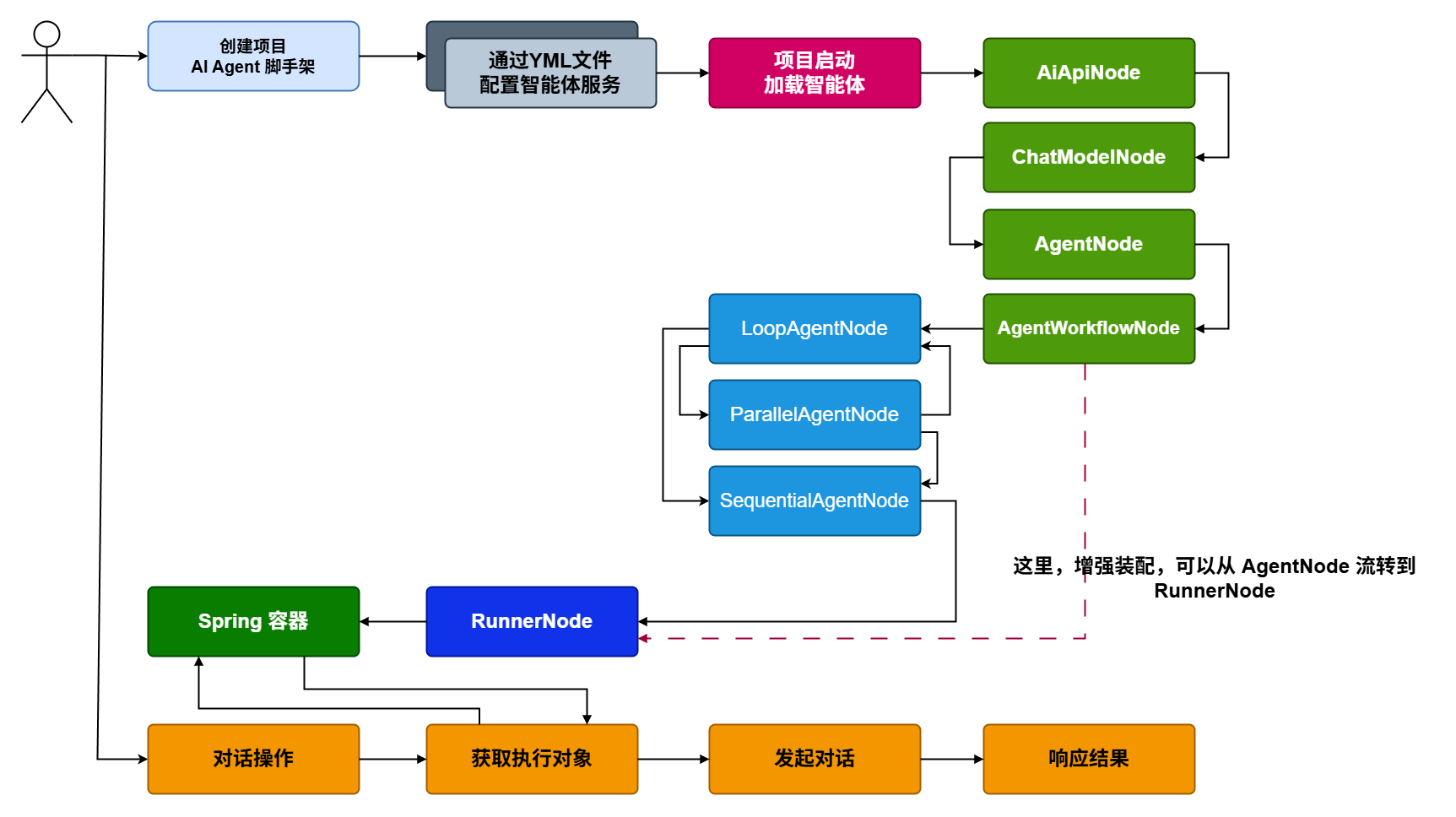
在前面内容的基础上,我们已经知道 RunnerNode 主要负责创建 InMemoryRunner。而创建该对象时,需要获取最终装配完成的 Agent 智能体。此前的实现中,通常会由 SequentialAgentNode 构建 SequentialAgent,并写入上下文,随后在 RunnerNode 中取出使用。其核心目的,就是为 InMemoryRunner 提供运行所需的 Agent 实例。
不过,这个 Agent 并不一定要通过固定编码的方式指定。我们可以在配置文件中增加 runner 配置项,用于声明需要装配到 Runner 中的 agent 名称。这样 RunnerNode 在构建 InMemoryRunner 时,只需要根据配置中的 agentName,从上下文中获取对应的 Agent 并完成装配即可。
最后,还需要考虑 AgentWorkflowNode 的流转时机。它是否继续流转,主要取决于当前 agentWorkflows 是否为空。如果为空,说明没有额外的工作流节点需要处理,可以直接进入 RunnerNode;而 RunnerNode 会根据配置中关联的 agentName 完成后续装配。关于这部分逻辑,结合 yml 配置文件来看会更加直观。
1. 工程结构
首先,在 AiAgentConfigTableVO 中新增 Runner.agentName 配置项,通过该参数即可明确指定运行节点所对应的智能体名称。
完成这一调整后,整体流程可以直接由 AgentWorkflowNode 流转至 RunnerNode,无需再额外处理 loop、parallel、sequence 等包装类型节点,从而让节点流转逻辑更加简洁,结构也更加清晰。
2. 核心模块
2.1 增加配置
2.1.1 配置对象
@Data
public class AiAgentConfigTableVO {

    /**
     * 应用名称
     */
    private String appName;

    /**
     * 智能体配置
     */
    private Agent agent;

    /**
     * 智能体模块
     */
    private Module module;

    @Data
    public static class Agent {

        /**
         * 智能体ID
         */
        private String agentId;

        /**
         * 智能体名称
         */
        private String agentName;

        /**
         * 智能体描述
         */
        private String agentDesc;

    }

    @Data
    public static class Module {

        private AiApi aiApi;

        private ChatModel chatModel;

        private List<Agent> agents;

        private List<AgentWorkflow> agentWorkflows;

        private Runner runner;

        // ... 省略部分

        @Data
        public static class Runner {
            private String agentName;
        }

    }

}
本节在 Module 模块中新增了 Runner 配置项,并通过 Runner 指定 agentName,实现最终执行智能体的灵活切换。这样不仅能够按需选择不同的 Agent,还能更方便地在测试阶段验证单体智能体与组合智能体的运行效果。
同时,RunnerNode 在构建 InMemoryRunner 时,也预留了插件扩展能力。例如,可以接入日志拦截、Callback 回调等机制,用于增强运行过程中的监控与事件处理能力。
2.1.2 配置文件
yml配置 only-one-agent.yml
ai:
  agent:
    config:
      tables:
        testAgent03:
          app-name: testAgent03
          agent:
            agent-id: 100003
            agent-name: 单一智能体
            agent-desc: 单一智能体
          module:
            ai-api:
              base-url: https://api1.oaipro.com
              api-key: sk-xxx
              completions-path: v1/chat/completions
              embeddings-path: v1/embeddings
            chat-model:
              model: gpt-4.1
              tool-mcp-list:
                - sse:
                    name: baidu-search
                    base-uri: http://appbuilder.baidu.com/v2/ai_search/mcp/
                    sse-endpoint: sse?api_key=bce-v3/ALTAK-6SyOtHHftyPsWLoIpz3WL/e7a0d8c2e39e9596b0f1e183cd985da1c32a0d67
                    request-timeout: 5000
            agents:
              - name: onlyAgent
                description: Spring Boot 学习计划
                instruction: |
                  通过百度检索Spring Boot编程实战项目,并根据检索内容,针对初学用户给出学习计划。
            runner:
              agent-name: onlyAgent
在 tables 配置中新增 testAgent03,用于演示单体 Agent 智能体的装配与运行。
需要注意的是,在 runner 配置下,需要通过
agent-name: onlyAgent明确指定当前运行节点所关联的智能体名称。这个配置属于必填项,无论是单体智能体,还是组合类型智能体,都需要通过 agent-name 进行绑定与指定。
agent-workflows:
  - type: parallel
    name: ParallelWebResearchAgent
    description: Runs multiple research agents in parallel to gather information.
    sub-agents:
      - RenewableEnergyResearcher
      - EVResearcher
      - CarbonCaptureResearcher
  - type: sequential
    name: ResearchAndSynthesisPipeline
    description: Coordinates parallel research and synthesizes the results.
    sub-agents:
      - ParallelWebResearchAgent
      - SynthesisAgent
runner:
agent-name: ResearchAndSynthesisPipeline- 例如,在复杂智能体场景下,同样需要在 runner 中配置对应的智能体名称。RunnerNode 会根据所指定的 agent-name,从上下文中获取对应的智能体,并将其装配到 InMemoryRunner 中完成运行。也就是说,无论当前配置的是单体智能体、串行智能体,还是并行、循环等复杂组合智能体,最终都会以 runner 中指定的 agent-name 作为执行入口,决定实际加载与运行的智能体对象。
2.2 节点流转
@Slf4j
@Service
public class AgentWorkflowNode extends AbstractArmorySupport {

    @Resource
    private LoopAgentNode loopAgentNode;

    @Resource
    private ParallelAgentNode parallelAgentNode;

    @Resource
    private SequentialAgentNode sequentialAgentNode;

    @Resource
    private RunnerNode runnerNode;

    @Override
    protected AiAgentRegisterVO doApply(ArmoryCommandEntity requestParameter, DefaultArmoryFactory.DynamicContext dynamicContext) throws Exception {
        log.info("Ai Agent 装配操作 - AgentWorkflowNode");

        AiAgentConfigTableVO aiAgentConfigTableVO = requestParameter.getAiAgentConfigTableVO();
        List<AiAgentConfigTableVO.Module.AgentWorkflow> agentWorkflows = aiAgentConfigTableVO.getModule().getAgentWorkflows();

        if (null == agentWorkflows || agentWorkflows.isEmpty()) {
            // 如果未配置 agentWorkflows 则直接流转到 RunnerNode
            return router(requestParameter, dynamicContext);
        }

        dynamicContext.setAgentWorkflows(agentWorkflows);

        return router(requestParameter, dynamicContext);
    }

    @Override
    public StrategyHandler<ArmoryCommandEntity, DefaultArmoryFactory.DynamicContext, AiAgentRegisterVO> get(ArmoryCommandEntity requestParameter, DefaultArmoryFactory.DynamicContext dynamicContext) throws Exception {

        List<AiAgentConfigTableVO.Module.AgentWorkflow> agentWorkflows = dynamicContext.getAgentWorkflows();

        if (null == agentWorkflows || agentWorkflows.isEmpty()) {
            return runnerNode;
        }

        AiAgentConfigTableVO.Module.AgentWorkflow agentWorkflow = agentWorkflows.get(0);

        String type = agentWorkflow.getType();
        AgentTypeEnum agentTypeEnum = AgentTypeEnum.fromType(type);

        if (null == agentTypeEnum) {
            throw new RuntimeException("agentWorkflow type is error!");
        }

        String node = agentTypeEnum.getNode();

        return switch (node) {
            case "loopAgentNode" -> loopAgentNode;
            case "parallelAgentNode" -> parallelAgentNode;
            case "sequentialAgentNode" -> sequentialAgentNode;
            default -> defaultStrategyHandler;
        };

    }
}doApply方法中,先判断agentWorkflows是否为空。如果为空,则不再执行当前节点的装配逻辑,直接调用router方法进入后续流程。在
get方法中同样增加判断:当agentWorkflows为空时,直接流转到runnerNode。这样就可以跳过后续的loopAgentNode、parallelAgentNode、sequentialAgentNode等包装节点处理,使流程更加精简。
2.3 执行构建(Runner)
ervice
public class RunnerNode extends AbstractArmorySupport {

    @Override
    protected AiAgentRegisterVO doApply(ArmoryCommandEntity requestParameter, DefaultArmoryFactory.DynamicContext dynamicContext) throws Exception {
        log.info("Ai Agent 装配操作 - RunnerNode");

        // 入参对象
        AiAgentConfigTableVO aiAgentConfigTableVO = requestParameter.getAiAgentConfigTableVO();
        String appName = aiAgentConfigTableVO.getAppName();
        String agentId = aiAgentConfigTableVO.getAgent().getAgentId();
        String agentName = aiAgentConfigTableVO.getAgent().getAgentName();
        String agentDesc = aiAgentConfigTableVO.getAgent().getAgentDesc();

        // Runner 运行体
        InMemoryRunner runner = this.createRunner(requestParameter, dynamicContext, appName);

        // 构建注册对象
        AiAgentRegisterVO aiAgentRegisterVO = AiAgentRegisterVO.builder()
                .agentId(agentId)
                .appName(appName)
                .agentName(agentName)
                .agentDesc(agentDesc)
                .runner(runner)
                .build();

        // 注册到 Spring 容器
        registerBean(agentId, AiAgentRegisterVO.class, aiAgentRegisterVO);

        return aiAgentRegisterVO;
    }

    private InMemoryRunner createRunner(ArmoryCommandEntity requestParameter, DefaultArmoryFactory.DynamicContext dynamicContext, String appName) {
        AiAgentConfigTableVO.Module.Runner runnerConfig = requestParameter.getAiAgentConfigTableVO().getModule().getRunner();

        // 获取智能体(用这个智能体装配 InMemoryRunner)
        BaseAgent baseAgent = dynamicContext.getAgentGroup().get(runnerConfig.getAgentName());

        // 会话运行节点
        return new InMemoryRunner(baseAgent, appName);
    }

    @Override
    public StrategyHandler<ArmoryCommandEntity, DefaultArmoryFactory.DynamicContext, AiAgentRegisterVO> get(ArmoryCommandEntity requestParameter, DefaultArmoryFactory.DynamicContext dynamicContext) throws Exception {
        return defaultStrategyHandler;
    }

}- RunnerNode 节点的改动主要体现在 InMemoryRunner 的组装逻辑上。以往创建 InMemoryRunner 时,会直接从上下文中获取固定的 SequentialAgent 实现作为执行智能体;现在则改为根据配置项
runnerConfig.getAgentName()指定的智能体名称,从dynamicContext.getAgentGroup()中查找对应的 Agent 实例,并将其注入到 InMemoryRunner 中完成构建。这样可以通过配置灵活切换运行时所使用的智能体,而不再依赖固定实现。
四、测试验证
1. 配置调整(yml)
新增了 only-one-agent.yml 智能体配置文件,并在 application-dev.yml 中完成引入和加载。同时,其他相关配置文件也需要同步调整,以保证整体配置的一致性和可用性。
此外,需要根据实际环境修改 Agent 配置中的 url 和 apiKey 参数,确保所配置的模型服务地址及鉴权信息有效,否则将影响智能体的正常加载与运行。
2. 单测方法
@Slf4j
@RunWith(SpringRunner.class)
@SpringBootTest
public class ChatServiceTest {

    @Resource
    private IChatService chatService;

    @Test
    public void test_handleMessage_01() throws InterruptedException {
        List<String> messages = chatService.handleMessage("100001", "cactusli", "你具备哪些能力");
        log.info("测试结果:{}", JSON.toJSONString(messages));
    }

    @Test
    public void test_handleMessage_03() throws InterruptedException {
        List<String> messages = chatService.handleMessage("100003", "cactusli", "给我一份学习计划");
        log.info("测试结果:{}", JSON.toJSONString(messages));
    }

    @Test
    public void test_queryAiAgentConfigList() {
        List<AiAgentConfigTableVO.Agent> agents = chatService.queryAiAgentConfigList();
        log.info("测试结果:{}", JSON.toJSONString(agents));
    }